Shelter Insurance
Redesigning the "find an agent" experience

Project overview
Timeline: 2.5 months (2024)
Role: Junior UX Designer
Impact: Platform transition affecting 1000+ Shelter agents and 270K+ site visitors
From outdated to user-centered: the starting challenge
As part of Shelter's digital transformation to Guidewire platforms, I tackled modernizing our 15-year-old agent finder that served 270K+ monthly visitors.
Throughout the flow, there were fundamental issues that made finding a great agent rather lackluster and disengaging:
Confusing search with unclear field hierarchy
Generic agent profiles that failed to differentiate agents
Limited information to help customers make decisions
These issues weren't just design problems - they directly impacted how potential customers connected with our 1000+ agents nationwide.
Rather than treating each screen as an isolated interface, I approached this as a comprehensive redesign of the entire agent discovery journey.
VISUAL
Uncovering agent workarounds and frustrations
After conducting in-depth interviews with 3 Shelter agents, I discovered:
Agents create workarounds (ex: LinkTree) to compensate for limited customization despite being unapproved
Generic advertisements misrepresent agents' actual business focus (ex: displaying renters insurance for rural agents who primarily sell farm policies)
No personal branding elements that builds trust in customers (awards, years of experience, community involvement)
I presented these findings to stakeholders to highlight these struggles and build stakeholder empathy to get buy-in for better, yet more technically complex, features.
“I've been using LinkTree because there's nowhere on my page to show what makes me unique. Clients don't know anything about me as an agent other than my contact info." - Shelter agent interviewee
VISUAL
Balancing regulatory constraints with personalization
Working with stakeholders revealed why the current design was so generic: regulatory risks ($50,000 fines), contractual limitations, and strict content approval requirements.
Yet within these constraints, I identified opportunities to push personalization:
Google Business Profile integration for trusted reviews and images
Structured approval process for agent-submitted content
Expanded pre-approved content options to maintain compliance

Making strategic design decisions driven by research
Throughout the design process, I made deliberate decisions based on research insights and stakeholder needs.
My decisions were guided by how they would impact the complete user journey from initial search to agent connection, ensuring a cohesive experience throughout:
Prioritizing trust signals with Google reviews
Placing Google ratings prominently at the top of the profile serves both user and business needs
Users can quickly gauge agent reputation, while stakeholders ensure only well-rated agents (4+ stars) are highlighted, maintaining Shelter's reputation for quality service
Visual
Improving how we display office hours
The original office hours display consumed excessive screen space yet was deprioritized in the visual hierarchy of the page
Agents were not required to input their hours, meaning this section would often disappear entirely
Drawing inspiration from Apple Maps, I designed an accordion that shows only the current day's hours by default, saving valuable real estate (especially on mobile) while still providing office hours for the entire week when expanded.
This approach also requires agents to provide their complete office hours, as this was optional before.
Visual
Highlighting agent distinctions with intentionality
Based on agent interviews that expressed desire to showcase accolades, I created a compact banner section showing key differentiators ("Veteran owned agency," "Shelter agent for 5+ years," etc.)
I placed this below essential contact information but above the agent's product offerings to ensure visibility without overshadowing contact details
Visual
Transforming generic cross-sells into agent-customized offerings
The original cross-sells were universally disliked by agents for being generic and irrelevant (they were also inaccessible!)
I redesigned these into cross-sells for each product line, giving agents the option to select 2 different products to advertise out of 12
This solved two problems: eliminating irrelevant marketing content and giving agents control over which products to highlight
Visual
Rethinking search results based on user behavior
After creating initial designs, I gathered feedback from both analytics data and agent interviews to make targeted improvements:
Transforming generic cross-sells into agent-customized offerings
The original cross-sells were universally disliked by agents for being generic and irrelevant (they were also inaccessible!)
I redesigned these into cross-sells for each product line, giving agents the option to select 2 different products to advertise out of 12
This solved two problems: eliminating irrelevant marketing content and giving agents control over which products to highlight
Design challenge: fighting information overload
My biggest challenge wasn't what to show - it was what to hide. My first iteration tried to show everything in a two-column layout, but my design team provided valuable critique:
"There's a lot happening, I'm not sure where to look first. Which of these things actually need my attention?" - UX team design critique
This early feedback from my team helped identify key issues:
Too many competing elements
Lack of clear visual hierarchy
Overwhelming amount of information

Making billing clearer
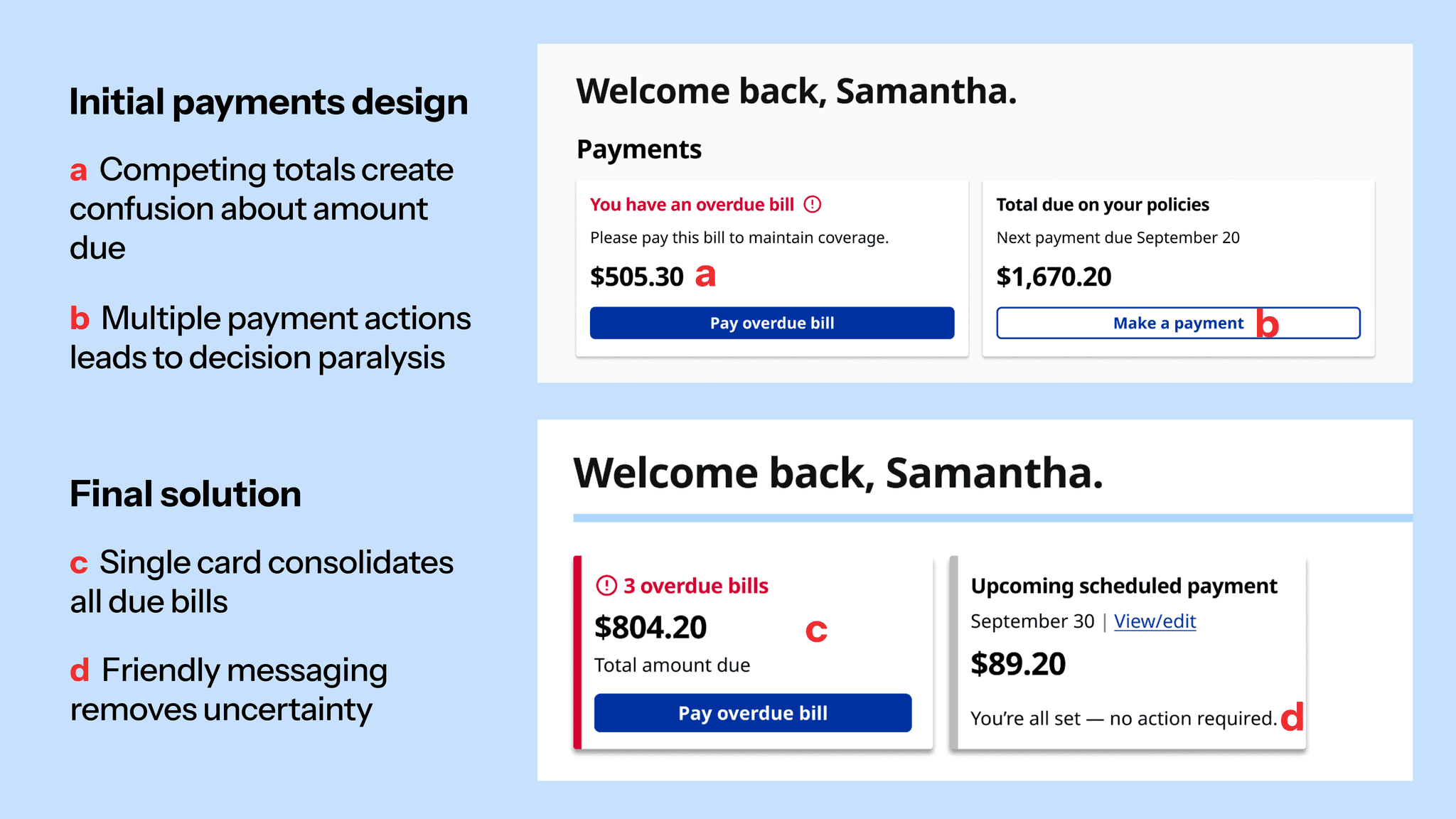
A unique challenge emerged around payment display. With multiple policies (home, auto, etc.), test participants were confused about total amounts due:
"Wait, so do I owe $150 total, or is that just for my car insurance? I can't tell if I'm looking at everything I need to pay.” - Usability test participant
Through iteration and testing, I developed a progressive disclosure approach:
Only show one “pay bill” card, regardless if past due or not.
Multiple “pay now” cards were disorienting. By handling overdue bills first, we gave our users a more clearer route to taking care of payments they needed to make.
We also group bills and totals into one card, simplifying the payment experience. Users are then taken to our payments landing page to review totals, due dates, policy details, etc.
The breakthrough: priority-based design
Through multiple iterations, I developed a card-based system that:
Prioritizes urgent actions (overdue payments, open claims)
Progressively discloses additional information
Transforms based on context (desktop vs mobile)
Working closely with my development team early on helped shape feasible solutions.

Stronger through collaboration: the policy section
While I led the dashboard redesign, another UX designer on my team was developing a dedicated policy management experience. We saw this as a chance to:
Create consistency across both experiences
Leverage each other's user research insights
Build a more cohesive product
Data showed most customers have 3 policies or less, which helped me decide how many policies we wanted to display on our dashboard's more focused view.
Through collaboration, we integrated her policy list design into the dashboard while ensuring both experiences felt unified.

Mobile-first transformation
Mobile users have fundamentally different needs when opening their insurance carrier's website on their phone.
Prioritizing critical features
Added “contact agent” and “Road Assist” as prominent buttons
Positioned high-priority actions for easy access
Simplified layout
Limited dashboard cards to 4 (vs 6 on desktop)
Presented policy information in a scannable, vertical layout
Maintained essential functionality while simplifying the interface

Engineering partnership
Working with my developers, I learned each policy required separate API calls for payments, claims, and policy details.
Rather than showing a generic loading state, I designed thoughtful loading skeletons that maintained the page's visual hierarchy.

Balancing business goals
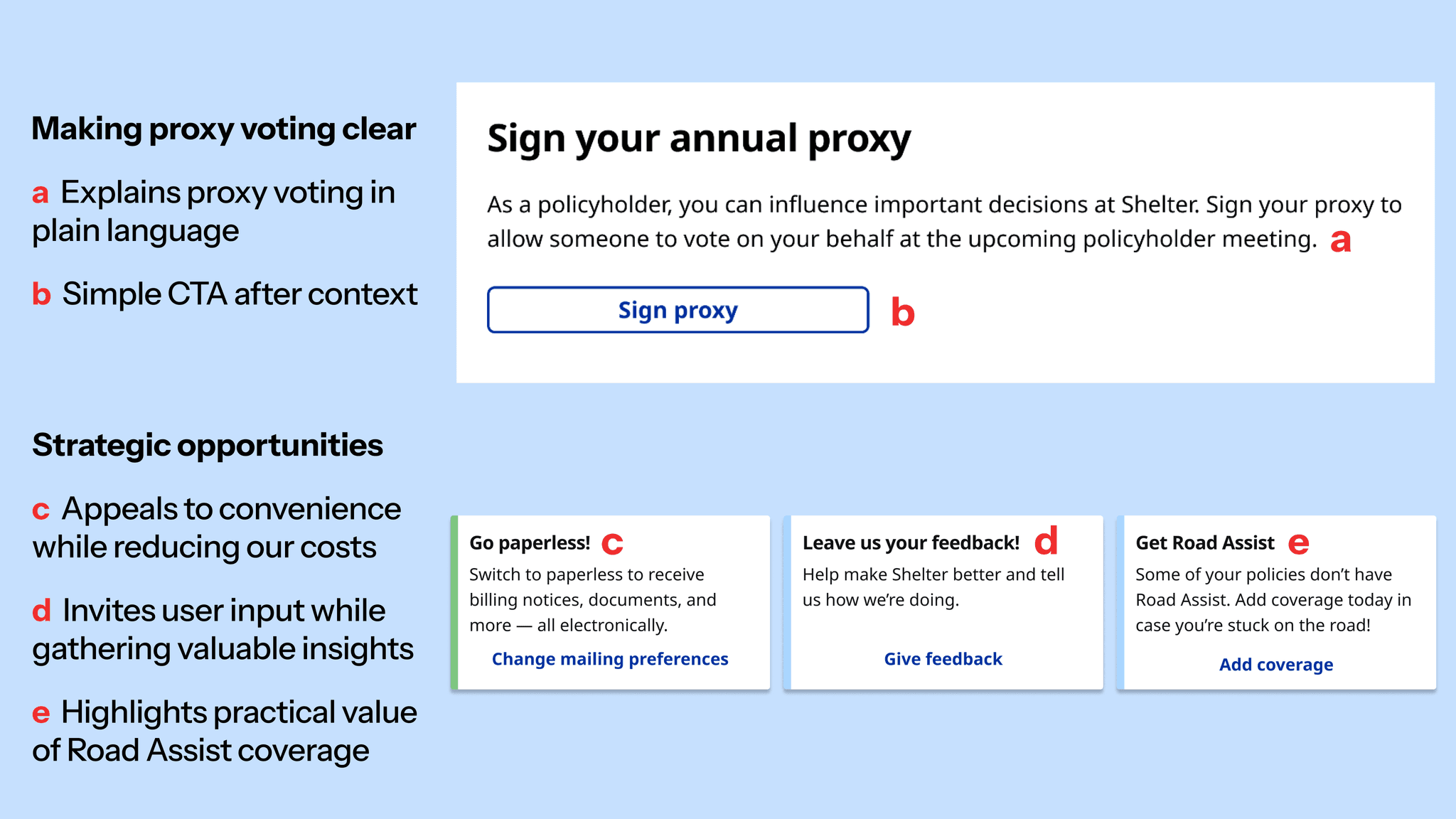
While focusing on customer needs, I also found opportunities to drive business value through strategically placed promotional cards:
Option to switch to paperless billing
Space for customers to give feedback
Recommendation for roadside assistance coverage
The key was ensuring these never overshadowed critical customer tasks by placing them after important content.
Final results: transforming the experience
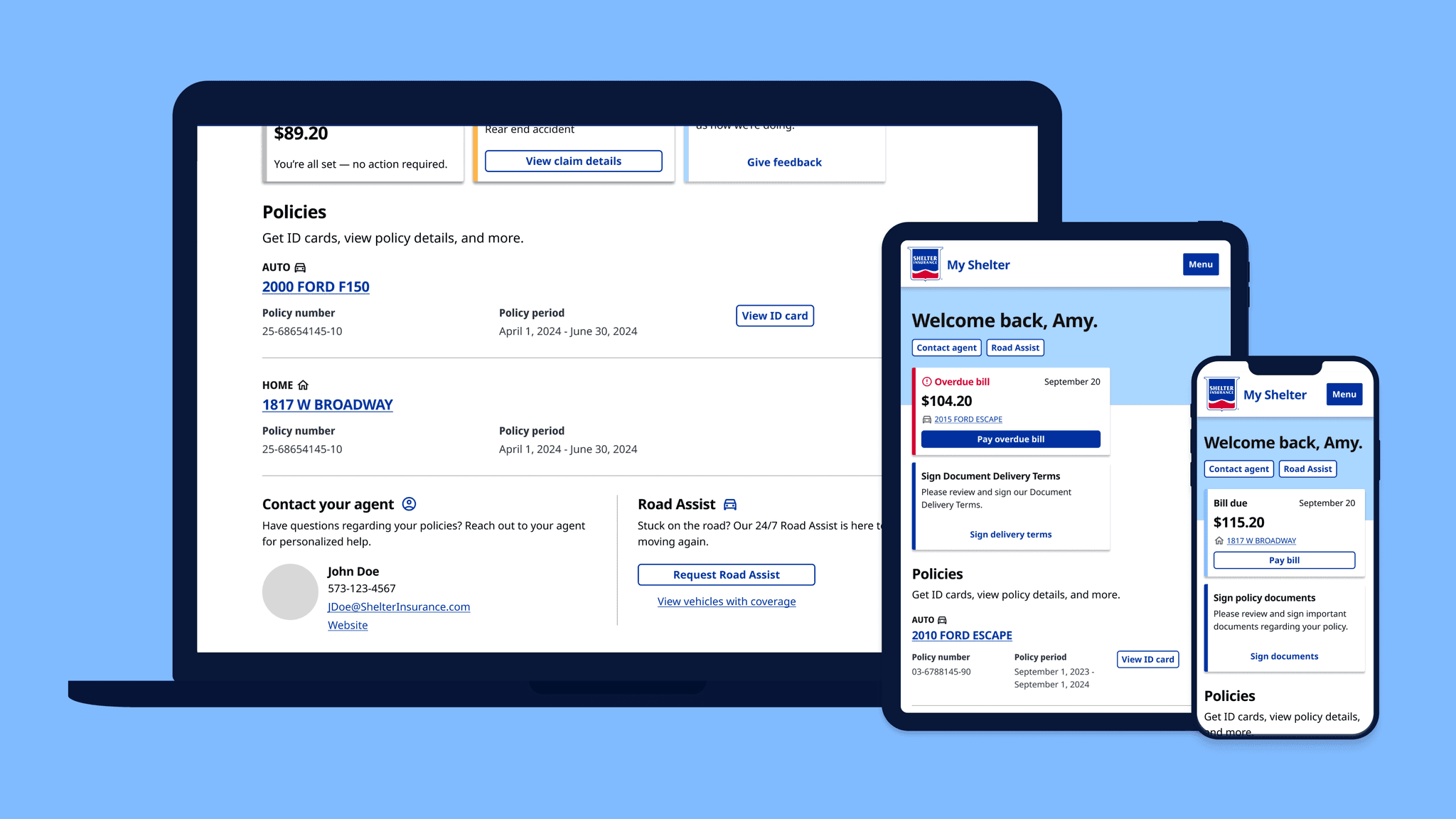
Through 10+ usability tests and multiple iterations, I transformed a static homepage into a dynamic, customer-centered dashboard.
Transformed a cluttered interface into a comprehensive dashboard - prioritizing payments, claims, and policies
Designed clear policy overview with ID cards available to view and print
Customized the experience for each device: easy-access emergency buttons on mobile, clear dashboard layout on desktop
Created a flexible card-based system that adapts to different user contexts and needs
Post-launch metrics

Refining through data
While the dashboard improved most metrics, post-launch data revealed an unexpected challenge: proxy signatures had decreased compared to the previous year.
Although we had made proxy voting easier to understand, moving it further down the page had impacted discovery.
I designed a solution that balanced visibility with our established hierarchy: a proxy card that appears after urgent tasks. After approval from our legal team, the solution will soon launch.

Since design is an ongoing process of learning and iterating, we'll continue monitoring signature rates as this solution launches.
Enjoyed this project? Read about my capstone project, Curly Journey.